반응형
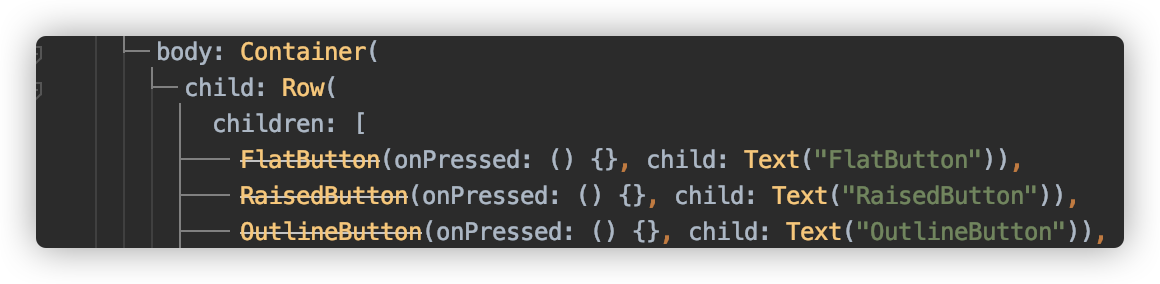
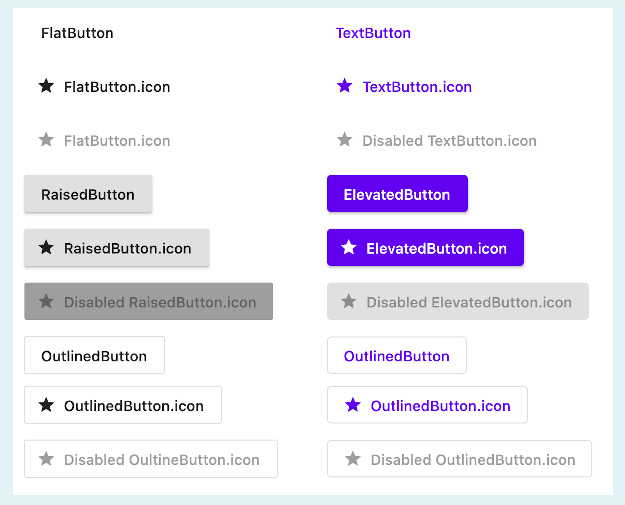
기존의 Material Buttons(FlatButton, RaisedButton, OutlineButton)들이 Deprecated 되었습니다. 대신 새로운 MaterialButton들을 사용해야 합니다. 새로운 Material Button들(TextButton, ElevatedButton, OutlinedButton)의 탄생 목적은 생성자 매개 변수와 테마를 통해 버튼을보다 유연하고 쉽게 구성하는 것이 목표입니다. 기존 버튼들은 각각 스타일을 변경해주어야 했지만 이제는 ButtonStyle 단일개체를 변경시켜주면 됩니다.
ButtonStyle's Constructor
import 'package:flutter/material.dart';

ButtonStyle({
  MaterialStateProperty<TextStyle> textStyle,
  MaterialStateProperty<Color> backgroundColor,
  MaterialStateProperty<Color> foregroundColor,
  MaterialStateProperty<Color> overlayColor,
  MaterialStateProperty<Color> shadowColor,
  MaterialStateProperty<double> elevation,
  MaterialStateProperty<EdgeInsetsGeometry> padding,
  MaterialStateProperty<Size> minimumSize,
  MaterialStateProperty<BorderSide> side,
  MaterialStateProperty<OutlinedBorder> shape,
  MaterialStateProperty<MouseCursor> mouseCursor,
  VisualDensity visualDensity,
  MaterialTapTargetSize tapTargetSize,
  Duration animationDuration,
  bool enableFeedback
})
예제
import 'package:flutter/material.dart';

void main() {
  runApp(MyApp());
}

class MyApp extends StatelessWidget {
  @override
  Widget build(BuildContext context) {
    return MaterialApp(
      title: 'Flutter Demo',
      theme: ThemeData(
        primarySwatch: Colors.blue,
      ),
      home: MyHomePage(title: 'Flutter 2.0 Widgets'),
    );
  }
}

class MyHomePage extends StatefulWidget {
  MyHomePage({required this.title});

  final String title;

  @override
  _MyHomePageState createState() => _MyHomePageState();
}

class _MyHomePageState extends State<MyHomePage> {
  @override
  Widget build(BuildContext context) {
    return MaterialApp(
      title: 'Flutter Widgets',
      theme: ThemeData(
        brightness: Brightness.dark,
        primaryColor: Colors.black,
        accentColor: Colors.white,
      ),
      home: Scaffold(
          appBar: AppBar(
            title: Text("Flutter Widgets"),
          ),
          body: Container(
            child: Column(
              children: [
                Row(
                    mainAxisAlignment: MainAxisAlignment.spaceEvenly,
                    children: [
                      FlatButton(
                        onPressed: () {},
                        child: Text("FlatButton"),
                        textColor: Colors.white,
                      ),
                      RaisedButton(
                          onPressed: () {},
                          child: Text("RaisedButton"),
                          textColor: Colors.white),
                      OutlineButton(
                          onPressed: () {},
                          child: Text("OutlineButton"),
                          textColor: Colors.white)
                    ]),
                Row(
                  mainAxisAlignment: MainAxisAlignment.spaceEvenly,
                  children: [
                    TextButton(
                      onPressed: () {},
                      style: ButtonStyle(
                        textStyle:
                        MaterialStateProperty.all(TextStyle(fontSize: 14)),
                        foregroundColor:
                        MaterialStateProperty.all(Colors.white),
                      ),
                      child: Text("TextButton"),
                    ),
                    ElevatedButton(
                      onPressed: () {},
                      style: ButtonStyle(
                          textStyle: MaterialStateProperty.all(
                              TextStyle(fontSize: 14, color: Colors.white)),
                          backgroundColor:
                          MaterialStateProperty.all(Colors.blue)),
                      child: Text("ElevatedButton"),
                    ),
                    OutlinedButton(
                      onPressed: () {},
                      style: ButtonStyle(
                        foregroundColor:
                        MaterialStateProperty.all(Colors.white),
                        textStyle:
                        MaterialStateProperty.all(TextStyle(fontSize: 14)),
                      ),
                      child: Text("OutlinedButton"),
                    )
                  ],
                )
              ],
            ),
          )),
    );
  }
}
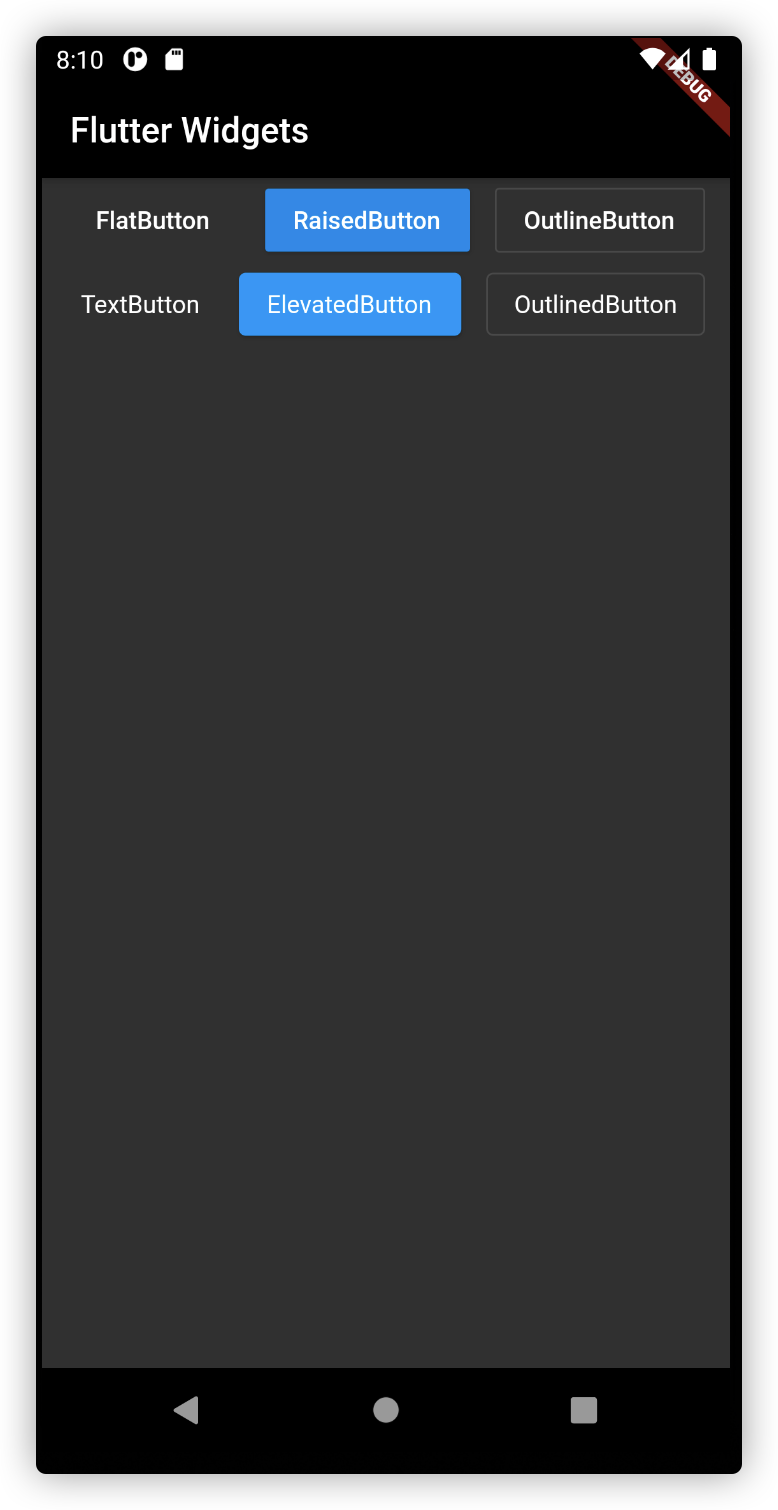
실행결과
StyleFrom 이용
제일 간단한 방법은 TextButton, ElevatedButton, OutlinedButton 각각에 존재하는 styleFrom을 이용하는 방법입니다.
styleFrom에는 각각 Button에 맞는 ButtonStyle들이 정의되어있어서 styleFrom을 이용하면 간단하게 ButtonStyle을 지정할 수 있습니다.
ElevatedButton의 styleFrom만 예를 들겠습니다.
ElvatedButton StyleFrom
ElevatedButton(
      child: Text('Button'),
      onPressed: () {},
      style: ElevatedButton.styleFrom({
           Color primary, // set the background color
           Color onPrimary,
           Color onSurface,
           Color shadowColor,
           double elevation,
           TextStyle textStyle,
           EdgeInsetsGeometry padding,
           Size minimumSize,
           BorderSide side,
           OutlinedBorder shape,
           MouseCursor enabledMouseCursor,
           MouseCursor disabledMouseCursor,
           VisualDensity visualDensity,
           MaterialTapTargetSize tapTargetSize,
           Duration animationDuration,
           bool enableFeedback
     }),
),
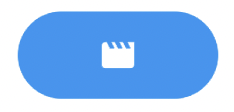
Elevated Button styleFrom 적용
ClipRRect(borderRadius: BorderRadius.circular(30),
          child: ElevatedButton(
          onPressed: () {  },
          child: Icon(
          Icons.movie,
          color: Colors.white
          ),
          style: ElevatedButton.styleForm(
          primary: Colors.blue,
          padding: EdgeInsets.symmetric(vertical: 15, horizontal: 50)
          ),
     ),
)
반응형